Colt Steele’s Web Development Bootcamp on Udemy Notes
Syllabus
- Course Intro
- Intro to Front End
- Intro to HTML
- Intermediate HTML
- Intro to CSS
- Intermediate CSS
- Bootstrap
- Bootstrap 4
- Bootstrap, Flexbox Layout
- JavaScript Basics
- JavaScript Control Flow
- JavaScript Functions
- JavaScript Arrays
- JavaScript Objects
- DOM Manipulation
- JavaScript Events
- Color Game Project
- Intro to jQuery
- Advanced jQuery
- Todo List Projects
- Patatap Clone
- Backend Basics
- The Command Line
- Intro to NodeJS
- Intro to Server Side Frameworks
- Intermediate Express
- Working with APIs
- YelpCamp Basics
- Databases
- YelpCamp Data Persistence
- RESTful Routing
- Data Associations
- YelpCamp Comments
- Authentication
- YelpCamp Authentication
- YelpCamp Cleaning Up
- YelpCamp Update and Destroy
- YelpCamp UI Improvements
- Git and Github
- Deploying
- JavaScript: The Tricky Stuff
02 Introduction to Front End
- Tools Required
- Text Editor
- VSCode, Atom, Sublime
- Web Browser
- Chrome, Safari, FireFox
- Lets you view web code
- Has developer tools
- Text Editor
- How the Internet Works
- Computers connected to internet send requests to Internet Service Provider; ISP translates domain name to IP address in order to request web page from correct server.
- Server sends response; split packets back to client through physical wiring.
- Server figures out what information to send back, combination of HTML CSS and JS.
- Viewing Code
- Right click, and use Developer Tools or View Page Source to view code.
- Types of Code
- Front End: What you see in your browser.
- HTML, CSS, JS
- HTML: HyperText Markup Language
- Structure of page, describes content.
- CSS: Cascading Style Sheets
- Defines style of html elements, content.
- JS: JavaScript
- Defines behavior of page.
- HTML: HyperText Markup Language
- Used to make static pages
- HTML, CSS, JS
- Back End: Logic done by server; Everything else.
- Used to make dynamic pages.
- Front End: What you see in your browser.
03 Introduction to HTML
- Basics
- HTML Encodes structure into a document, rather than plaintext.
- Originally used for scientific documents.
- Allows hyperlinking to other resources.
- Syntax
<tagName>some content</tagName><selfClosingTag />-
<parentTag attribute="value">
    <childTag>content</childTag>
</parentTag>
<!-- comment -->
- Boilerplate
-
  <!DOCTYPE html>
  <html>
  <head>
  <!-- Metadata here -->
  <meta name="" content="" />
  <link href="" rel="" type="" />
  <title>page title</title>
  </head>
  <body>
      <!-- Content here -->
  </body>
  </html>
-
- Common elements
- block level, take up page width
- html, root element, contains all document
- head, contains metadata
- body, contains content
- h1 - h6, document headings
- p, paragraph
- ol, ul, li, lists and items
- div, groups stuff together
- inline, describe text; should not contain block levels
- a, anchor (link)
- img src
- strong, bold
- em, italic
- span, groups text together
- other
- meta
- link
- title
- script
- comments
- block level, take up page width
- attributes
- src, for
imgs &scripts; url - href, for
links andas
- src, for
- best practices
- use descriptive tags, eg. not
<b>for bold
- use descriptive tags, eg. not
04 Intermediate HTML
- HTML Tables
tableelement contains a tabletrdescribes a table row with one or moretditems.tdis a single table cellthis a table header.theadcan containtr’s withth’stbodycan contain regulartr’s
- HTML Forms
formelement contains a form- attributes: action, method
input, allows user input, many types- text
- dropdowns
- checkboxes, radios
- submit
- more types
label, labels input field- validation
Introduction to CSS
- Intro CSS
- role
- styles html
- general rule
-
selector {
  property: value;
  property: value;
}
-
- role
- Incorporate CSS in HTML
- use
<style type="text/css"></style>to use internal css - use
<link rel="stylesheet" href="style.css" type="text/css" >to connect external stylesheet
- use
- Select elements by tag, class, id
- element selector: selects all elements with tagname
- class selector: selects all elements with class name
- id selector: selects element with id.
- complex selectors
- *, selects all elements.
- descendant selectors,
p a, anyaelement that is descendant ofp. - child selector,
p > a, anyathat is a direct child ofp. - adjacent selector,
p + a, anyathat is next top. - attribute selectors,
a[href=""], anyawithhrefattribute empty. - nth of type,
p:nth-of-type(3), selects the 3rdpelement in a list.
- Style selected elements
- many properties to style html
- common properties
- color: {hex value, keyword, or rgba value}
- Specificity, overriding
- CSS Rules with higher specificity override those with lower specificity, and rules with same or greater specificity will override rules that come earlier in the stylesheet.
- Specificity order: *, tag, class, id, inline, !important
- Chrome dev tools
- allows ispection of elements, sources, css, etc.
06 Intermediate CSS
- font properties
- font-family
- font-size
- font-weight
- line-height
- text-align
- text-decoration
- box model
07 Bootstrap
08 Bootstrap 4
09 Layout
10 JavaScript Basics
11 JavaScript Control Flow
12 JavaScript Functions
13 JavaScript Arrays
14 JavaScript Objects
15 JavaScript DOM
16 JavaScript Events
- Allows interactivity
- Event listeners can be attached to a particular element (
document.querySelctor().addEventListener(*type*, *callback*)).
- Event listeners can be attached to a particular element (
17 Color Game Project
18 jQuery Intro
jQuery is a frontend javaScript library that assists in selecting, styling, and manipulating DOM elements.
- Makes it very easy to iterate over a list of elements.
Including
Include script src in HTML Document
- https://code.jquery.com/
Selecting
jQuery selects dom elements with the $() function.
- Acts like document.querySelectorAll();
- Takes a CSS Selector string as argument
Manipulating
$() has several common methods to manipulate HTML
- css()
- .css() method takes property-value pairs, or an object with styles added, and applies styles to all elements returned by $() selection.
- camelCased CSS properties, rather than kebab-case
- .css() method takes property-value pairs, or an object with styles added, and applies styles to all elements returned by $() selection.
- val()
- text()
- Can get textcontent, or set its textcontent from selected elements
- attr()
- Get the value of attributes, or set attributes for selected elements (pass in pair or object)
- html()
- Can get innerHTML, or set its innerHTML from selected elements
- addClass()
- removeClass()
- toggleClass()
19 jQuery Advanced
jQuery Events
jQuery lists have methods to simplify JavaScript Events
$('.selector').*event*(/*function to run on click*/);
Also use $('this') instead of this in callback functions.
If callback is passed an event arg, can be used to listen for specific key
$('input').keypress(function(event) {
    console.log(event.which);
    // Returns char key code
});
jQuery Event Types
jQuery has lots of events on documentation
click()keypress((e)=>{})on(*event*, [child] (e)=>{})- click, dblclick, dragstart, etc.
- Can be used to add event listeners to yet unexisting elements by selecting the parent and using the child argument
jQuery Effects
Animations on stuff
$("button").on("click", function() {
    $("this").fadeOut(duration, callback);
});
Animations
- fadeIn, fadeOut, fadeToggle
- slideUp, slideDown, slideToggle
- etc
20 Todo List App
21 Patatap Clone
SKIPPED
22 Backend Basics
Servers decide what content to send to clients over the internet.
You ask for a web page, and you get one back.
Types of sites
- Static Sites
- Same files are sent every time (HTML, CSS, JS)
- Dynamic Sites
- Compiled on server side, before sending back as response
Stack: the languages and technologies that an app uses (front + back ends)
- Front End: HTML, CSS, JavaScript, sent to client
- Back End: does business logic, processing, etc.
Full Stack developers write code on all parts of the stack: front and back ends
HTTP In Depth (Postman)
Postman can be used to send customizable HTTP requests without worrying about rendering in the browser.
- Useful for determining if an API is working
23 Command Line
Lets you interact directly with the computer by telling it what to do with commands
- Can do more than a GUI
- Faster, once you know it well
- Sharp learning curve
24 Intro to Node
Node is a JavaScript engine for a backend server, which can integrate with the NPM collection of libraries.
- Large community, actively developed
- Easy to learn after JavaScript, same language
Using Node
Node is run in the console by running command node
- Can call a JavaScript file to run
- Lets you execute JavaScript code as well as backend libraries
Node Package Manager
Lets you use pre-written code libraries, or packages, super easily. (No CDN, automatic dependency management)
to use NPM, run npm install in command line from project directory, then in js file type const pkg = require('pkg');
package.json
Used by NPM to keep track of module dependencies, and to easily be able to install them. Lets you send a “shopping list” instead of shipping all the ingredients.
Using NPM
npm initinitializes package.json by asking questionsnpm installinstalls packages to node_modules
Types of Dependencies:
- Dependencies: Required by running code (React, Express)
npm install --saveornpm i -S(Default)
- Dev Dependencies: used in workflow but not running code (preprocessors, compilers)
npm install --save-devornpm i -D
Automatic Server Restart (Nodemon)
Normally, you have to run node app.js every time you make a change in order to see it.
Nodemon automatically detects changes and can run scripts when files are changed.
npm i -g nodemoninstalls nodemon globally, lets you run as command- add
npm nodemon app.jsto npm scripts - run npm scripts
25 Express Framework
Frameworks provide a baseline way of doing things in code. You must write code that conforms to the specifications of the framework.
You can call a Library, but a Framework calls you.
Express Framework is a server framework which receives requests and returns a response
Routing
Routes: runs one bit of code vs another depending on request
// client requests / root page
app.get('/', function(request, response){
    res.send(); // what to send to client
});
//app.get(*, function(req,res)) {} lets you catch-all (404)
Routing Parameters: lets you use URL to create DRY code instead of creating an app.get() for every single item
app.get('/r/:subredditName/comments/:id/:title/', func..)
Gets passed back to server via req.params{subredditName: soccer}
26 Intermediate Express
Instead of rendering single lines, or typing entire HTML documents into a res.send function, you can use res.render to return an entire file (HTML or EJS).
Render searches for a file by default in the views directory, where you can put all the served files an partials
EJS (Embedded JavaScript) is a templating language that expands JS and HTML.
To use JavaScript in an EJS file, use syntaxes:
<%= //JavaScript %>for evaluation (5 + 5, obj.prop)<% //JavaScript %>for logic or multiline JS (can’t be evaluated, returns part that is not in <% %> tags<%- include('partials/file') %>include a partial file<%- %>can also be used to eval code like HTML
To pass variables into a template, use the render method’s second parameter to pass an object.
res.render('home.ejs', {user: req.ip});
Including files
Most assets like images, css, and js files go in a separate directory. Can be served by using app.use(express.static('public')); in app.js. Still must link files. Should reference them in root, since public directory ‘explodes’ in root.
Partials are incomplete, but reusable sections of a page like navbars and footers. Goes in views
<%- include('partials/navbar') %>
Post Requests
Most routing is done with app.get, but you can also run code when a post request is made, like from a form
- Create a route
app.post('/route', (...) => {...}), which will receive post requests - Create a form that points to that route
- Form values are returned to server in
req.bodywhich must be parsed by NPM Packagebody-parser
27 Working with API’s
Application Programming Interfaces API’s allow you to connect with other applications instead of doing everything from scratch.
- Web API’s: communicate over HTTP/HTTPS
- IFTTT (IF This Then That): Connect API’s together
- ProgrammableWeb: repository of public APIs
- JSON Placeholder: lets you generate placeholder data for mocking up an application
Transferring Data
API’s send data over HTTP using either XML or JSON or some other technologies
API Requests with Node
You can make a request using a browser’s URL bar, or using builtin libraries in languages.
To request using Node, use request or axios
Request is deprecated! Use Axios instead.
// first install with npm
const request = require('request');

request('https://url.tld', function (error, response, body) {
    if (!error && response.statusCode == 200) {
        console.log(body);
    }
})


// or use axios
const axios = require('axios'); // npm install axios
axios({
    method: 'get',
    url: '/url',
})
    .then(response => {
        console.log(response);
    })
    .catch(error => {
        console.log(error);
    })
    .finally(() => {
        // always executed after the request
    });
After getting JSON data from API, must be converted from JSON string into object format.
const data = JSON.parse(body);
You can then ‘drill down’ and get a particular piece of information from the data.
const info = data["list"]["towns"];
28 YelpCamp 1
Add GET and POST routes, EJS pages, submission form, etc.
29 Intro to Databases
Collection of information / data
- Databases let servers have persistent data that remains even after restarting
- Has an interface that you can use to access data
- Create, Read, Update, Delete
SQL (Relational) Database
Tabular, flat databases that work by creating relationships to other tables (Entity Relationship Diagram)
- Each database has tables (entities)
- Each table has rows (records / entries) which represent an instance of the entity.
- Tables also have columns (attributes / fields)
- At the intersection of each record and field, is a value or cell
Relationships are specified in their own “join” table, using a primary key from each table.
Cannot easily add fields; would have to do for each user. Patterns have to be defined ahead of time
NoSQL (Non-Relational) Database
Patterns do not have to be strictly adhered to; more flexible. Easier to update Formatted as BSON: Similar to JSON
- No Primary Keys, flat tables, or relationships
- things can be nested together, instead of relationships
MongoDB
Most popular NoSQL software
- Uses JSON instead of tables
- Can implement JavaScript
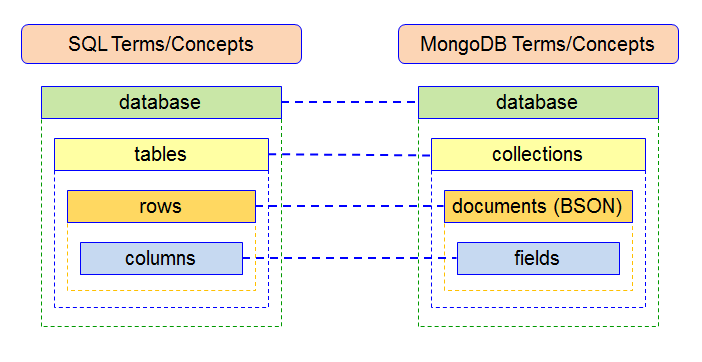
Collection == Table (should be plural and lowercase) Document == Row / Record / Object Fields == Column / Field / Attribute
Commands
help // shows commands
mongo // runs mongo shell (write commands)
mongod // runs mongo daemon (basically server; accepts commands)
`mongod --dbpath="C:/Program Files/MongoDB/Server/4.2/data"` // run as administrator


show dbs // show existing dbs
use *db* // sets working db, or create new empty db
db // Shows working db

show collections // show
db.createCollection(name, options)
db.*collection*.*method*() // methods can be chained
// === collection methods ===
db.*collection*.insertMany([
    *document*,
    {key: 'value', key: 'value'}
])
.insert([{key: 'value'}]) // insert one or more documents
.find() // select *
.findOne({key: 'value'}) // find({}).limit(1)
.find({key: 'value'}) // find matching documents
    // Find Operators: $ {key: {$gt | $gte | $lt | $lte} }
    .pretty() // pretty print output
    .limit(*n*) // limits number of results
    .sort({id: *1 | -1*}) // sort by id attribute,
    .forEach((doc) => {}) // run code for each result
        print() // like console.log
    .map((doc) => {}) // return something from each entry
.count() // returns number of results
.update({find}, {new data}, {options}) // find and replace
    //  Options: "upsert" creates if does not exist yet
    //  new data: an object, or an operator
        //  $set: {} does not replace (adds)
        //  $inc: {} increments fields
        //  $rename: {} key to new key
.remove({key: 'value'})
Mongoose
Object Data Mapper; Helps to interact with MongoDB from within Node; like jQuery for DOM. Creates Schema for applications.
npm install mongoose
const mongoose = require('mongoose');

//               protocol://url/database
mongoose.connect('mongodb://localhost/testing')

// Creates outline for entity
const customerSchema = new mongoose.Schema({
    name: String,
    age: Number,
    personality: String
});

// Creates instance (document, object) from schema
// (collection, schema)
// this creates a model with methods!
const Customer = mongoose.model("customers", customerSchema);

Customer.find({}, (err, item) => {
    if (err) {
        console.log("===ERROR===\n" + err);
    } else {
        console.log("Items!\n" + item);
    }
});

// New Customer and Save customer both at once
Customer.create({
    name: "Julian",
    age: 20,
    personality: "Giving",
    isTrending: false // this will get thrown out since not in schema
}, function(err, item) {
    if (err) {
        console.log("===ERROR===\n" + err);
    } else {
        console.log("Added to Database:\n" + item);
    }
});
30 YelpCamp + MongoDB
Improve styling, add and integrate MongoDB
31 RESTful Routing
A pattern for defining routes; maps HTTP requests to CRUD
REST: REpresentational State Transfer
RESTful Routes
Patterns for an app that interacts with server
- Index: GET all items
GET /indexindex can be dogs etc - New: GET form to create new item
GET /index/new - Create: POST new item to db
/POST /index/ - Show: GET a single item
GET /index/:id - Edit: GET form to edit item
GET /index/:id/edit - Update: PUT new value
PUT /index/:id - Destroy: DELETE specific item
DELETE /index/:id
These can connect to:
- Create (POST)
- Read (GET)
- Update (PUT)
- Delete (DELETE)
You will also have nested routes, like creating a comment on a post (associated data)
32 Data Associations
Relationships between collections in database Example:
- Users
- Posts
- Comments
Types of Relationships
- One to One
- One Employee, One Title
- One to Many
- One user, many uploads
- Many to Many
- Many students, many courses
- Many Books, many authors
Associations in Mongoose
Can be made with either embedding or referencing
Embedded Data
When creating the schema for one model, make the schema of the other model one of the attributes.
// Configure Schemas
const postSchema = new mongoose.Schema({
    title: String,
    content: String,
});

const userSchema = new mongoose.Schema({
    email: String,
    name: String,
    posts: [postSchema] // One User to Many Posts
});

// Then initialize containing model
const User = mongoose.model('users', userSchema);
const newUser = new User({
    name: 'Heck',
    email: 'heck@heck.com',
    posts: [
        {
            title: 'Heck a bit harder',
            content: 'it\'s good exercise'
        }
    ],
});
// Add to contained model
newUser.posts.push({
    title: 'Hecking to the Heck',
    content: 'You should heck as much as you can'
});
Referenced Data (Object References)
Instead of embedding the entire schema, you can use references to a mongodb document’s id
const userSchema = new mongoose.Schema({
    email: String,
    name: String,
    posts: [
        {
            // References an object's ID
            type: mongoose.Schema.Types.ObjectId,
            // collection (same as model's string)
            ref: 'posts'
        }
    ]
});
Then, you push instances of the post to user’s posts array.
After that, when you want to use the referenced object, you do Model.findById(id).populate('collections').exec((err, item) => {}).
module.exports
You can split up files into multiple parts by using export and require.
You can export an object, almost like a return value from a file using module.exports = {};.
33 Refactoring YelpCamp
- Modularizing code (module.exports, require)
- Adding models for users, comments
- “Add Comment” functionality, routes
- Styling show page to be FANCY
34 Authentication
Authentication is how a user proves who they are on the web (passwords, accounts)
Sessions
Provides State to HTTP; saves whether the user is still logged in.
Libraries
- passport (Authentication Library)
- passport-local (Username / Password)
- passport-local-mongoose (Integration with Mongo)
- express-session (Save “logged in” state)
Passport.js
Authentication library for Node.js, already built with support for MANY types of authentication
- Google, Facebook, Twitter
- Fitbit, Steam, Azure
- Local (Username / Password)
35 Yelpcamp 4 | Authentication
- Add users, authentication
- register, login, logout routes and pages
- authorization (only logged users in can comment)
- navbar logic
- refactor, split files
36 Yelpcamp 5 | Data Association
- associate comments with users
- associate campgrounds with users
37 Authorization
Once you know who someone is, you can find out what they are allowed to do.
Yelpcamp 6 | Authorization
- edit campgrounds & comments + routes
- authorization for editing / deleting campgruonds & comments
- Refactoring middleware
38 Yelpcamp 7 | UI Improvements
39 Git, Github
Git
Version Control System
- Lets you work with different versions and ‘checkpoints’
- Lets you save different branches, merge changes
- Good for collaboration
Github
Online platform that uses git to share and version code.
- You can save and clone repositories over the internet for free.
Git Commands
Main commands you will use
- Initialize Git Repository (tell git which files to monitor)
cd ./ ; git init - Add selected files to staging area
git add [files] git statussee status of files (staged, untracked, etc.)- always check git status
- Add staged files to commit
git commit -m "commit message"- each commit has a long hash id
git loggit branchchange branches or create a new one; used to create new features or bugfixesgit checkoutlook at a different version of code, like time travel- HEAD is the commit currently being viewed; checking out detaches the head from master
git checkout mastergo back to normalgit revert --no-commit 23456..HEADrevert to a previous version, by reverting all commits- look this up online; rare use case, many ways to do
40 Deployment
Having the app constantly running on a server and available anywhere
- Good to separate development from production (debugging, adding features)
- Can host on own computer, or use cloud hosting services
Cloud Deployment Tools
Companies that will let you rent server space for apps
- DigitalOcean, NodeJitsu, Modulus, LiNode, OpenShift
- Amazon Web Services, Microsoft Azure, Google Cloud
- Heroku (FREE, many languages)
Heroku
Free hosting platform with many language choices, good for NodeJS
- Create account with Heroku
- Download Heroku CLI, run
heroku loginpackage.json should have npm start script with
node app.js - Create Git repository & add files
- Create heroku app,
heroku create- Creates git remote
- Commit & Push changes to heroku
git push heroku master
- View error messages
heroku logsOR you can connect a github repo to heroku
Environment Variables
It is good to separate certain things like production and development
- Don’t want to test around with production database, corrupt data, delete values, etc
- Don’t want to expose private keys / passwords on github
- Good for portability across deployment platforms
- ALWAYS hide API keys to avoid theft and getting billed
Environment Variables let you have different values depending on the place of deployment
- Is good to have a fallback:
|| 3000for example
Accessing Environment Variables
Reference environment variables by writing process.env.VARNAME
Creating Environment Variables
There are many ways to create environment variables
- Use a
.envfile which you .gitignore to prevent exposing data- use npm package
dotenvto grab data from that file
- use npm package
- use the command
exportto save a variable as a computer environment variableexport VARNME=value
- (Heroku) Go into
settings > config variablesand add a new environment variable- or, use command line:
heroku config:set VARNAME=value
- or, use command line:
41 Advanced JavaScript
JavaScript has some tricky concepts, outlined below
this keyword
Context-dependent value with implications for OOP
- Reserved keyword (cannot be used as var name)
- Determined by execution context: how function is called
- Four rules: global, object/implicit, explicit, new
Global Context
When this is in a function, or is not in an object
- In browser, refers to
windowobject - Has global variables:
this.var = 5; - contains other objects, like
console,document, etc.
Object / Implicit Context
When this is in an object or method, this refers to closest parent object.
- An object method with
thisevaluates to the object itself thisin an event refers to the the HTML Element
Explicit Binding Context
You can explicitly set the value of this to use in a function.
- Use
call,apply, orbind - Call: thisArg, parameters, invokes immediately
- Apply: thisArg, parameter array, invokes immediately
- same as apply, but with arguments array
- Bind: thisArg, parameters, returns new function with new value for
this(used in setTimeout, react, etc.)- Should use Bind in a setTimeout, because function is called later in global context
| Method | Parameters | Invokes? |
|---|---|---|
| Call | this,1,2,3 | Yes |
| Apply | this,[1, 2] | Yes |
| Bind | this,1,2,3 | No, later |
obj.method.apply(thisObj, [arg1, arg2]);
const boundMethod = obj.method.bind(this, arg1);
boundMethod(arg2);
setTimeout(() => {...}.bind(this), 1000)
new Context
When creating an object with the new keyword, this refers to created object.
- Can be used in constructors
- This is why constructors must have
newkeyword
function Person(name) {
    this.name = name;
}
“use strict”;
Subset of JavaScript with stricter rules, designed to prevent bugs and be more secure.
- Prevents global variables
- Adds new keywords that cannot be used as varnames
thisin a function isundefined, instead of global
Object Oriented Programming
Programming paradigm based on the idea of objects
- Objects are constructed from classes, and are instances of a class
- Classes are made to be abstract, modular, reusable.
New Keyword
Keyword used to create objects
- Creates an empty object
- Sets
thisin function to be the empty object & populates fields - Adds implicit
return thisto the end of constructor - Adds property called
__proto__, linking to constructor prototype
Constructor Functions
A class has a function that creates an instance of an object, each with similar properties
- Constructors are capitalized
- Properties are attached to
this, which refers to the created object when usingnew. - Does not return anything unless using
new, which then returns an object fromnew constructor()
function House(beds, baths, sqft) {
    this.beds = beds;
    this.baths = baths;
    this.sqft = sqft;
    return this;
}
const myHouse = new House(2, 2, 1000);
Extending a Constructor (Pre-ES6)
You can apply/call a base constructor inside another constructor to extend a class and make the subclass inherit its parent’s properties
- Great for avoiding code duplication
function Person(name) {
    this.name;
}
function SmallPerson(name, height) {
    Person.call(this, name); // extends Person constructor
    this.height = height;
}
function WeirdPerson(name, personality) {
    Person.apply(this, arguments);
    this.personality = personality;
}
Prototypes
Objects share methods and properties through the prototype chain.
- Constructors have a property object called
.prototype .prototypehas a property called.constructorwhich points back to constructor.prototypehas methods and properties accessible from ANY instance of the constructor (inherited)- Each object created from Constructor inherits
.prototypeand its.__proto__. - Like passing by reference instead of value; the prototype is one object that all descended objects refer to
person.__proto__ === Person.prototype- Every object inherits a prototype from another object
- The Object prototype inherits from null
- JavaScript primitives like numbers and strings inherit from Object
- This is the prototype chain
- JavaScript searches up the chain to see if an object or its ancestors has a method
ES6 Object Oriented Programming
ES6 adds new syntax to JavaScript’s OOP functionality
class Human extends Animal {
    constructor(name) {
        super(arguments); // runs parent's constructor
        this.#name = name; // private var #
        this.type = human;
        this.legs = 2;
        this.sound = "hello";
        this.speak = this.speak.bind(this);
    }
    speak() {
        console.log(`${this.name} says ${this.noise}`);
    }
    get name() {
        return this.name;
    }
    set sound(newSound) {
        this.sound = newSound;
    }
    static method() {   // static means only class can use
        return 'waaah'  // instances cannot use
    }                   // similar to Math.method()
}
https://www.sitepoint.com/javascript-private-class-fields/
Closures
A nested function, where the inner function depends on values from the outer function
- Can call inner function immediately, or save and run later
- Good for creating private variables
function adder(a) {
    return function(b) {
        return a + b;
    }
}
adder(5)(10); // 15; runs both funcs at once


function classRoom() {
    const instructors = ['colt', 'elie'];
    return {
        getInstructors: function() {
            return instructors;
        },
        addInstructor: function(newInstructor) {
            instructors.push(newInstructor);
            return instructors;
        }
    }
}
const c1 = classRoom();
c1.getInstructors(); // returns array
To Do:
- Learn Handlebars.js instead of EJS
- https://medium.com/@waelyasmina/a-guide-into-using-handlebars-with-your-express-js-application-22b944443b65
- https://www.youtube.com/watch?v=1srD3Mdvf50&ab_channel=Academind
- Learn Pug templating language
Resources
- Course
- Documentation